Verification Checklist
-
DIP DNS check:
- Attempt to SSH into the Endgame server via hostname to verify that DIP DNS resolution is functioning properly:
ssh endgame@endgameTROUBLESHOOTINGIf you are unable to resolve
endgame, this can be due to one of the following issues:- Your MIP's
/etc/resolv.confis not pointing to pfSense and/or does'nt have the search domain set to<KIT_DOMAIN>
search <KIT_DOMAIN>
nameserver 10.<X>.<Y+3>.2- The DNS Forwarder on pfSense is not pointing to the Controller (
10.<X>.<Y+1>.15) for the<KIT_DOMAIN>Domain Override
-
License check:
- From the Endgame server CLI, verify that the installed license is valid for the duration of the mission:
(SMP console)> license status

+-----------------+------------------------------------------------------------------+
|       Key       |                              Value                               |
+-----------------+------------------------------------------------------------------+
|     org_name    |                             Default                              |
|   grace_period  |                                14                                |
|       mcm       |                               True                               |
|    sign_date    |                       2022-12-13 07:18:51                        |
|    account_id   |               bf5c40a1-3a03-43f1-bf1e-b1d338ccc20f               |
|  instance_guid  | 834809ad0f2a2a7c209dbf68002ea5aab6a1d572682ef44d8d4fb85fcb79297d |
| expiration_date |                       2023-11-29 00:00:00                        |
|   warn_period   |                                10                                |
|     arbiter     |                               True                               |
|    signed_by    |                         elastic-release                          |
|    endpoints    |                                0                                 |
|       cli       |                               True                               |
|    statedesc    |                         license is valid                         |
|      state      |                                0                                 |
+-----------------+------------------------------------------------------------------+LICENSINGThe Endgame self-service license request link can be found on the 262COS/DOK SharePoint (access restricted). Re-licensing Endgame involves the following:
- Display the unique Hardware Token with
license requestcommand - Paste the unique Hardware Token to the Endgame self-service portal
- Check your email associated with your Endgame self-service account
- Copy the license text to a file and transfer it to the MIP
- Submit the license text with the
license installcommand
-
Endgame DNS check:
- From the Endgame server CLI, drop into a bash shell and verify that Endgame is pointing to pfSense:
shell
cat /etc/resolv.conf
search <KIT_DOMAIN>
nameserver 10.<X>.<Y+2>.1
- From the Endgame server CLI, drop into a bash shell and verify that Endgame is pointing to pfSense:
-
Endgame NTP check:
- From the Endgame server CLI, drop into a bash shell and verify that Endgame's NTP configuration has an entry pointing to pfSense:
shell
cat /etc/chrony.conf
server 10.<X>.<Y+2>.1 iburst
- From the Endgame server CLI, drop into a bash shell and verify that Endgame's NTP configuration has an entry pointing to pfSense:
-
Elastic Streaming check:
- From the Endgame web UI under the EVENT STREAMING section of Endgame’s Administration -> STREAMING tab, streaming is "Connected to Logstash:
http://logstash:9800" - From the Endgame web UI under the FORWARD ALERTS section of Endgame’s Administration -> STREAMING tab, Threats and Adversary Behaviors are being forwarded to
syslogtcp://logstash:9801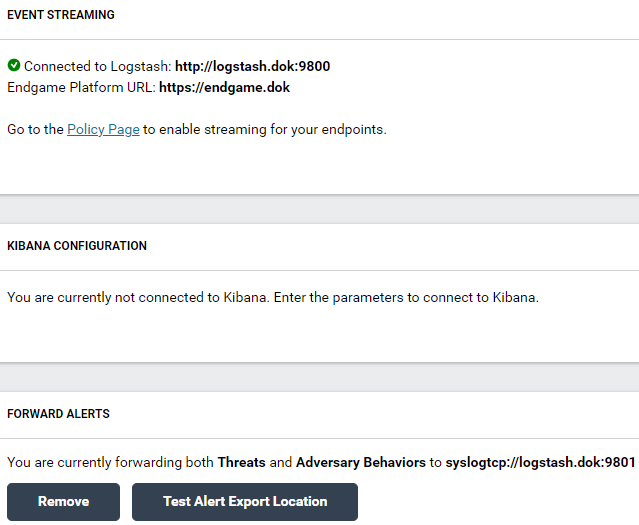
TROUBLESHOOTINGIf EVENT STREAMING displays an error connecting to Logstash, this is likely due to one of the following reasons
- The Logstash pod is not running, or is still initializing (if it was restarted within 5 minutes)
- pfSense's DMZ interface does not a have the rule ("Allow Endgame Alert Forwarding to Logstash") allowing Endgame to connect to Logstash on
TCP/9800-9801
- From the Endgame web UI under the EVENT STREAMING section of Endgame’s Administration -> STREAMING tab, streaming is "Connected to Logstash:
-
Sensor Configuration check:
- From the Endgame web UI within the Administration -> POLICY tab, the following policies are present:
DO-NOTHINGDETECT-ONLYDETECT+STREAMPREVENT-ONLYPREVENT+STREAM
- From the Endgame web UI within the Administration -> SENSOR tab, the following profiles are present with the
DO-NOTHINGPOLICY andhttps://<DIP_EXTERNAL_IP>:443TRANSCEIVER ADDRESS:PERSISTENTDISSOLVABLE
TROUBLESHOOTINGIf Sensor Profiles/Policies are not configured, configure them IAW 262COS-EG-SOP-001 - Endgame Sensor Setup
- From the Endgame web UI within the Administration -> POLICY tab, the following policies are present: